MCP Servers for Online Shops: A Practical Guide
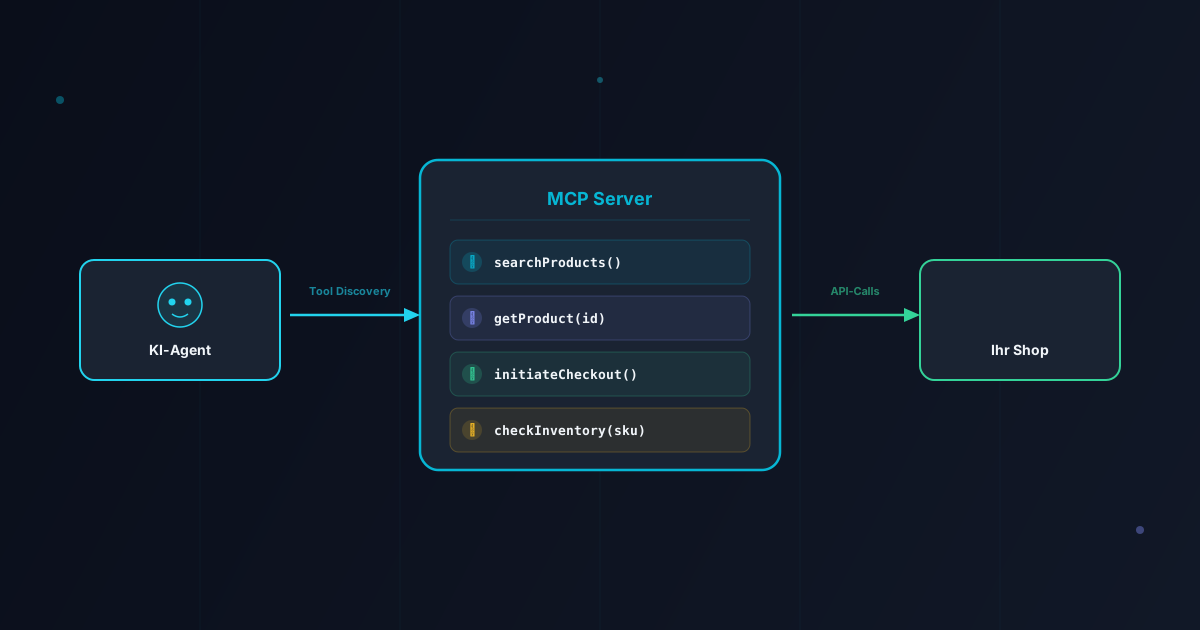
The Model Context Protocol (MCP) is the standard interface between AI agents and the digital world. For online shops, an MCP server is becoming as essential as a website was in 2000 or a mobile app in 2010. Here is how to build one.
What Is MCP — and Why Should Merchants Care?
The Model Context Protocol was introduced by Anthropic in late 2024 and has since become the de facto standard for connecting AI agents with external systems. At its core, MCP defines a structured way for an AI agent to discover what a server can do, call specific tools, and receive structured responses.
Think of it this way: traditional APIs are designed for developers who read documentation and write code. MCP servers are designed for AI agents that discover capabilities at runtime. The agent connects to your MCP server, asks "what can you do?", receives a list of tools with descriptions and parameter schemas, and then decides autonomously which tools to call.
Why does this matter now? Because AI agents are already shopping. ChatGPT's Instant Checkout, Google's agent integrations, and open-source frameworks like OpenClaw are all using MCP to discover and interact with merchants. If your shop lacks an MCP server, these agents will simply shop elsewhere.
MCP Architecture for E-Commerce
An MCP server for e-commerce follows a clear three-layer architecture:
| Layer | Responsibility | Components |
|---|---|---|
| Transport | Communication protocol | HTTP with SSE (Server-Sent Events), or stdio for local tools |
| Protocol | Message format, tool discovery | JSON-RPC 2.0, tool schemas, resource definitions |
| Business Logic | Your shop's functionality | Product search, pricing, inventory, checkout |
The transport layer handles how agents connect to your server. For web-based deployments, HTTP with Server-Sent Events (SSE) is the standard — it allows the server to stream results back to the agent in real time. The protocol layer uses JSON-RPC 2.0, the same lightweight format used by language servers in code editors. The business logic layer is where your shop-specific code lives.
When an agent connects, the handshake follows a predictable sequence: the agent sends an initialize request, the server responds with its capabilities, and then the agent can call tools/list to discover available tools. Each tool has a name, description, and a JSON Schema defining its input parameters. The agent uses these descriptions to decide when and how to call each tool.
Which Tools Should Your MCP Server Expose?
The tools you expose determine what AI agents can do with your shop. Here is a prioritized list, from essential to advanced:
Essential (Day 1)
- search_products: Full-text and faceted search across your catalog. Parameters: query, category, price range, in-stock filter. This is the most-called tool — agents use it to match user intent to your products.
- get_product: Detailed product information by ID or SKU. Returns name, description, price, images, variants, availability, and reviews.
- check_availability: Real-time stock status for a specific product variant. Critical for agents that need to confirm availability before recommending a product.
Important (Week 1)
- get_shipping_options: Available shipping methods, costs, and estimated delivery dates for a given address and cart.
- create_cart: Initialize a shopping cart and add items. Returns a cart ID that can be passed to the checkout flow.
- initiate_checkout: Start the checkout process, returning a checkout URL or a structured checkout object for the Agentic Commerce Protocol.
Advanced (Month 1)
- track_order: Order status and tracking information for a given order ID or email.
- initiate_return: Start the returns process for a specific order item.
- get_recommendations: Personalized product recommendations based on browsing or purchase history.
- check_coupon: Validate a coupon code and return the discount amount.
A common mistake is exposing too many tools at once. Start with the essentials, measure how agents use them, and expand gradually. Every additional tool increases the cognitive load on the agent — and the attack surface for your shop.
Shopify's Native MCP Server
Shopify has been at the forefront of agentic commerce adoption. Their native MCP server, available to all Shopify merchants, covers the most common use cases out of the box:
- Product search with full-text and faceted filtering
- Product details including variants, images, and metafields
- Cart management (create, add, update, remove)
- Checkout initiation with ACP compatibility
- Order tracking for authenticated customers
For Shopify merchants, the recommendation is straightforward: start with the native MCP server. It requires minimal configuration — enable it in your Shopify admin, and agents can immediately discover and interact with your shop. Only build a custom MCP server if you need capabilities the native solution does not provide, such as proprietary pricing logic, custom product configurators, or integration with external inventory systems.
Shopify's MCP server handles authentication via OAuth tokens scoped to specific permissions. An agent that only needs to search products receives a read-only token. An agent that initiates checkouts receives a more permissive token. This granular permission model is a best practice worth emulating in custom implementations.
Building a Custom MCP Server with FastMCP
If you need a custom MCP server — because you run a custom shop platform, need proprietary business logic, or want tighter control — FastMCP is the fastest way to get started. FastMCP is a Python framework that abstracts away the protocol details, letting you focus on business logic.
The development process follows four steps:
Step 1: Define Your Tools
Each tool is a Python function decorated with @mcp.tool(). The function's docstring becomes the tool description that agents see. Type hints become the JSON Schema for parameters. This convention-over-configuration approach means you write normal Python functions, and FastMCP handles the protocol translation.
Step 2: Connect to Your Data
Your tools need to access product data, inventory, and checkout systems. Use your existing database connections, API clients, or ORM. FastMCP does not prescribe a data layer — it works with whatever you already have.
Step 3: Add Authentication
Production MCP servers must authenticate incoming agent connections. The standard approach is OAuth 2.0 bearer tokens. Each token should be scoped to specific tools — a customer support agent gets different permissions than a purchasing agent.
Step 4: Deploy
FastMCP servers can be deployed as standard ASGI applications behind any reverse proxy. For production, use Uvicorn behind Nginx or Caddy, with TLS termination at the proxy level. The server should be stateless — all session state lives in the agent, not the server.
For TypeScript shops, the official MCP TypeScript SDK provides equivalent functionality. The same architectural principles apply: define tools as functions, connect to your data, add authentication, and deploy behind a reverse proxy.
Best Practices for Production
Running an MCP server in production requires attention to several concerns that do not arise in development:
- Rate limiting: AI agents can be aggressive callers. Implement per-token rate limits to prevent a single agent from overwhelming your systems. A reasonable starting point is 60 requests per minute per token.
- Caching: Product data changes infrequently relative to how often agents request it. Cache search results and product details for 5-15 minutes to reduce database load.
- Logging: Log every tool call with the agent's identity, parameters, and response time. This data is invaluable for understanding how agents interact with your shop and where they struggle.
- Versioning: Version your MCP server API. When you add new tools or change parameter schemas, agents built against the old version should continue to work.
- Health checks: Expose a health endpoint that monitoring systems can poll. If your MCP server goes down, agents cannot interact with your shop.
- Response size limits: Agents have context windows. A search that returns 500 products will overwhelm most agents. Limit results to 10-20 items and provide pagination tools.
Security Considerations
An MCP server is, in effect, an API that AI agents can autonomously call. The security implications are significant:
- Input validation: Agents may send unexpected parameters. Validate all inputs strictly against your JSON Schema. Never trust agent-provided data for database queries — use parameterized queries only.
- Authentication scope: Every agent connection must be authenticated. Use the principle of least privilege — an agent should only access the tools it needs for its specific function.
- Transaction limits: If your MCP server can initiate purchases, enforce per-session and per-day transaction limits. An agent with a compromised token should not be able to drain inventory.
- Prompt injection resistance: Agents may relay user inputs that contain prompt injection attempts. Your MCP server should treat all string parameters as untrusted data, not as instructions to be interpreted.
- Audit trail: Maintain a complete audit log of all agent actions, especially those that modify state (cart additions, checkout initiations, order modifications). This is essential for dispute resolution and regulatory compliance.
A robust security posture is not optional. As agentic commerce scales, MCP servers will become high-value targets for attackers who want to exploit the trust relationship between agents and merchants.
Conclusion
An MCP server is the minimum viable interface for participating in agentic commerce. Without one, your shop is invisible to the growing population of AI agents that are searching, comparing, and purchasing products on behalf of consumers.
The good news: the barrier to entry is lower than you might expect. Shopify merchants can activate native MCP support today. Custom shop operators can build a functional MCP server in days using FastMCP or the TypeScript SDK. The protocol is standardized, well-documented, and supported by every major AI platform.
The merchants who build their MCP servers now will be the ones agents recommend first — because they will be the only ones the agents can see.
Frequently Asked Questions
What is an MCP server?
An MCP (Model Context Protocol) server is a standardized interface that exposes your shop's data and functionality to AI agents. Think of it as an API designed specifically for AI — it tells agents what tools are available, what parameters they accept, and what data they return.
Do I need an MCP server if I use Shopify?
Shopify already provides a native MCP server that covers product search, cart management, and checkout. For most Shopify merchants, the built-in solution is sufficient. Custom MCP servers become valuable when you need to expose proprietary business logic, custom pricing rules, or integrations with non-Shopify systems.
How long does it take to build an MCP server?
With FastMCP (Python) or the official TypeScript SDK, a basic MCP server exposing product search and checkout can be built in 1-2 days. A production-grade server with authentication, rate limiting, caching, and comprehensive tooling typically takes 2-4 weeks.